"Virtual fitting room" sounds like one thing. In practice a shop might mean a live camera filter that puts sunglasses on your face, a mannequin-like avatar built from your measurements, or a generated photo of you wearing a coat you found online. They work differently, need different things from you, and fail in different ways. If you know which one you are looking at, you know what to believe.
The short answer
- AR overlay tracks your body in a live camera feed and draws a prepared 3D or 2D garment on top. Fast and interactive; weak on clothes that drape.
- 3D avatar builds a digital body from your measurements or a scan and simulates a digitized garment on it. The only approach that can say something about the fit of a specific size; rarely looks like you.
- AI photo try-on takes your photo and a photo of the garment and generates a new image of you wearing it. Looks like you and works with almost any garment; it is a picture, not a measurement.
AR overlay: a garment drawn over your camera
Augmented reality try-on runs on your phone or a screen in a shop. Software estimates where your body is in each video frame, usually by finding key points such as shoulders, elbows, hips and the outline of your face. A garment or accessory that someone has already modeled as a 3D asset is then positioned on those points and drawn on top of the live picture, many times a second.
That is why AR works so well for things that sit on a rigid part of the body. Glasses follow your nose and ears, a watch follows your wrist, lipstick follows your lips. Shoes are harder but workable, because a foot is a fairly predictable shape.
Clothes are where it struggles. A real shirt folds, stretches and hangs; an overlay mostly moves with the tracked points. Loose garments, long skirts and coats often look pasted on, float slightly in front of you, or slide when you turn. Lighting rarely matches your room, so the garment can look too bright or too flat.
What you need, and what you get
- Needs: a camera, decent light, and an item the shop has prepared for AR. You can't point it at a random product photo.
- Good for: eyewear, makeup, jewelry, hats, watches, sneakers. Seeing yourself move.
- Limits: little or no realistic drape; only works inside that shop's prepared catalog; fit is not measured at all.
3D avatar: a digital body and a simulated garment
An avatar fitting room starts with your body. You type in measurements (height, weight, chest, waist, hips, inseam) or let the app estimate them from a couple of photos or a phone scan. It builds a 3D body from those numbers.
The garment side is the expensive part. To be useful, the brand needs a digital version of the actual garment, ideally built from the same sewing pattern pieces used in production, with fabric properties such as stretch and weight. Cloth simulation then "sews" the pieces around the avatar and lets gravity pull them into place. Some tools show a heat map of where the garment is tight or loose.
This is the one kind of virtual fitting room that can say something meaningful about whether size M or L fits better, because it is working with real dimensions on both sides. That comes with conditions: your measurements must be accurate (most people's home measurements are a little off), the garment must have been digitized faithfully, and the fabric simulation has to behave like the real cloth.
What you need, and what you get
- Needs: careful measurements or a scan, time to set up, and a retailer that has digitized the specific item.
- Good for: comparing sizes of the same garment; seeing where a cut may pull.
- Limits: the avatar looks like a mannequin, not like you, so color and style judgments are hard; catalogs are small; quality varies a lot between apps.
AI photo try-on: a new photo of you wearing it
This is how every example on this site was made. You give the system two things: a photo of yourself and a photo of a garment (or a shop link it can pull the product image from). An image generation model then produces a new photo in which you, in your pose, your room and your light, are wearing that garment.
The model has learned from a very large number of images how fabric tends to fold over shoulders, how a hem falls, how a collar sits at the neck. It uses that to draw a believable version of the garment on your particular body. Nothing is measured; it is closer to a skilled illustrator redrawing your photo than to a tailor with a tape.
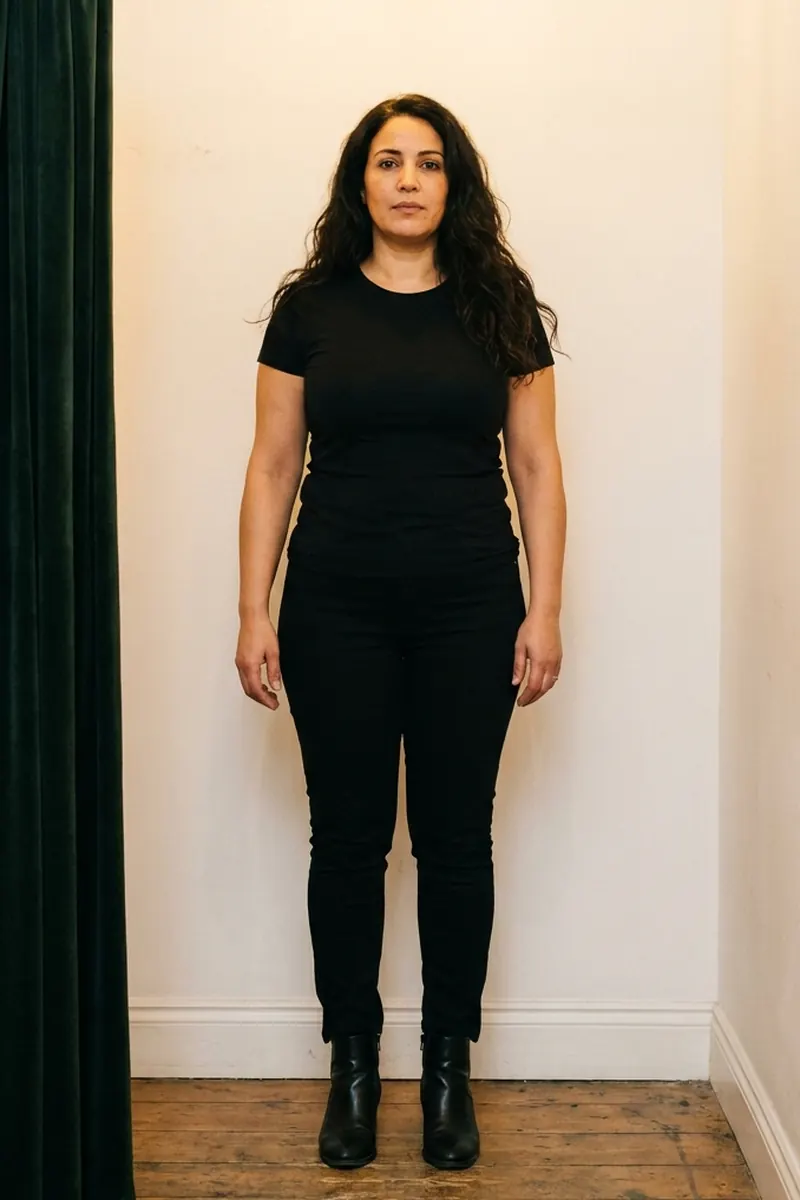 Original photo
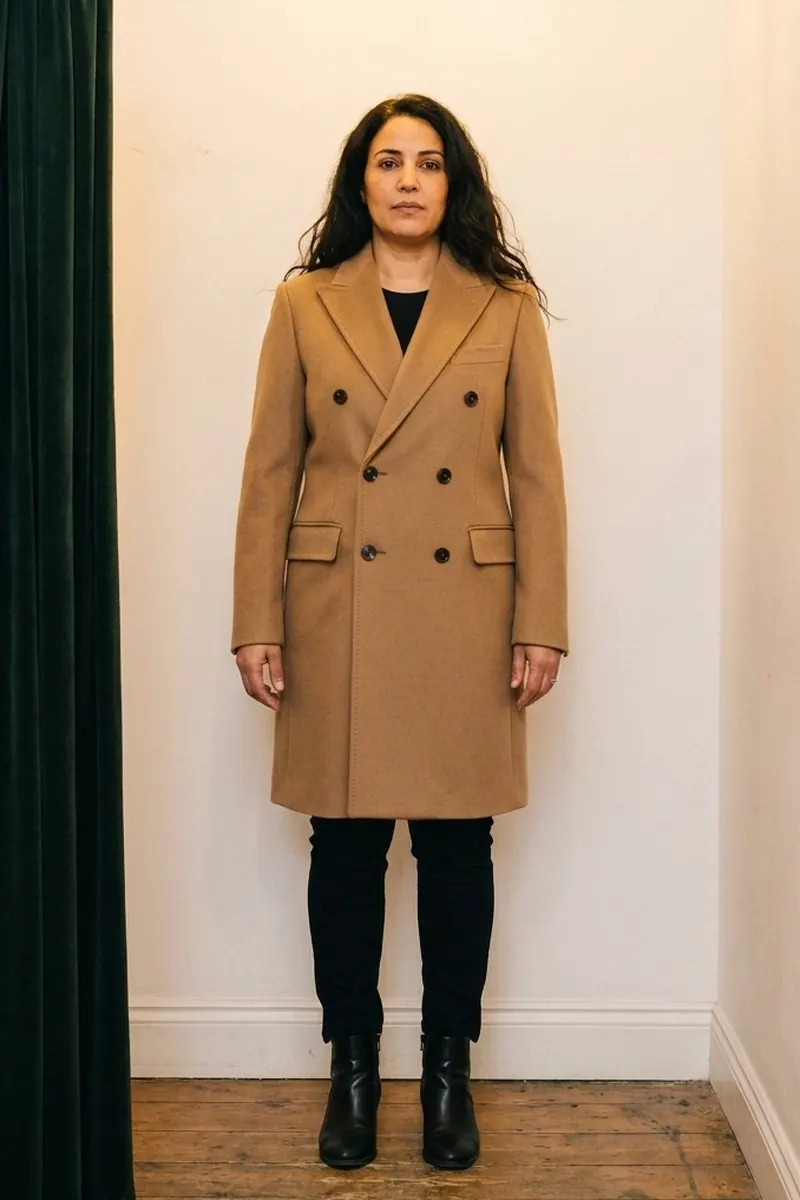 AI try-on example
Where it shines
- It looks like you, so you can judge color against your own skin and hair, and style against your own proportions.
- It works with almost any garment: a product page, a screenshot, a photo of something in a shop window.
- It needs nothing but a photo. No measurements, no scan, no special catalog.
Where it falls short
- Size and fit are not known. The model doesn't know whether you would order an 8 or a 12, or that this brand runs small. It draws a plausible fit, usually a neat one with nothing pulling or bunching.
- Details can drift. Button counts, the exact scale of a print, a small logo or a particular seam may come out slightly different.
- Results vary. Running the same pair twice can give two slightly different images. Busy prints, sheer fabrics, layered outfits and unusual poses are harder.
- It is a still image, so you can't turn around or see the back unless your photo shows your back.
Side by side
| Question | AR overlay | 3D avatar | AI photo try-on |
|---|---|---|---|
| Input from you | Live camera | Measurements or scan | One photo |
| Garments it can show | Items prepared by that shop | Items digitized by that brand | Any clear garment photo or product page |
| Looks like you | Yes, live | Rarely | Yes, still image |
| Shows drape | Weakly | Yes, simulated | Yes, drawn from learned examples |
| Says anything about size | No | Yes, within the accuracy of your measurements | No |
| Best at | Glasses, makeup, jewelry, shoes | Comparing sizes of one garment | Style, color and "is this me?" |
What none of them can tell you
Even the best setup leaves some questions to your hands and a tape measure. No current virtual fitting room reliably tells you how a fabric feels against your skin, how warm it is, whether it creases after an hour of sitting, whether a white shirt is see-through outdoors, or how comfortable a waistband is after lunch. Those are still answered by the fabric composition on the product page, reviews from people who have worn it, and your own experience with similar pieces.
A useful way to split the job: a try-on answers "do I want this on me?" and a size chart answers "which one should I order?". Treat them as two separate checks. The returns and fit guide covers the second one.
Which one to use when
- Buying glasses, makeup or jewelry: an AR try-on from the shop is usually the best tool, because you can move and see it from different angles.
- Torn between two sizes of the same item: if the brand offers a 3D fit tool for that item, use it, and enter measurements taken with a tape, not from memory.
- Not sure a color, cut or style suits you: an AI photo try-on on your own photo answers that most directly, and works across shops.
- Building an outfit from different shops: AI photo try-on again, because neither AR nor avatar tools work outside the catalog that prepared them.
If you go the AI route, two things make the biggest difference to the result: the photo of you and the photo of the garment. See the photo tips, and the routine in using a virtual fitting room for online shopping.
How the examples on this site were made
The 19 looks in the fitting room gallery were made with FitInView's try-on, using the same instructions it applies when you upload your own photo. Each one started from the person photo and the single product photo shown with that look, with no retouching afterward. That makes five people, ten garments and 19 try-ons in total. The five people are AI-generated models rather than customers, so nobody's real photo is on show. Where a result didn't match its garment (one sweater try-on swapped the sweatpants for jeans), it was run again rather than edited.